

Overview of Opal Documents
A Docment is one of Opal’s block-editor-enabled item types in its page view. On a workspace grid, a document is a very faint, light gray rectangle that’s 100 x 155 pixels at 100% zoom, and generally looks like a document on a piece of paper.
The default width of a Document’s page view is 840px on a screen size that’s large enough to allow this width. The Document’s width will downsize to fit any screen size.
Purpose & Examples
Documents are primarily intended for written content, but are also designed to store images and videos within its block editor. Use Documents for:
- Typing notes during a meeting or class
- Authoring plans
- Authoring training documents
- Authoring procedures
- Storing markdown text (for AI/LLMs)
- Client Tracking for Independent Insurance Agents
- Contractor Job Tracking Without Project Management Overkill
Should I Use Opal Document(s) to Write My Next Book?
Yes and no.
For example, if this is a fiction book, yes you should use Opal Documents to author and cross reference character notes, scenes, settings, plots, etc.
However, for the actual book writing, I recommend a traditional word processor that supports all of the formatting requirements necessary for publishing.
Tip: If you’re using Google Docs, you can store the Google Doc’s URL as an iframe in Opal, which lets you edit the Google Doc from Opal.
How I Use Documents
With a workspace of over 200 items and counting, the majority of my items are Documents. Here are some ways of how I use them:
- Meeting notes: I take calls every week and I type notes in a Document (Using AI notes often defeats the purpose of committing the notes to memory, which happens while writing them). Tip: For regular weekly meetings, store them in a Binder.
- Standard Operating Procedures: Many SOPs are cross-referenced with other SOPs using Opal’s Item Link feature:
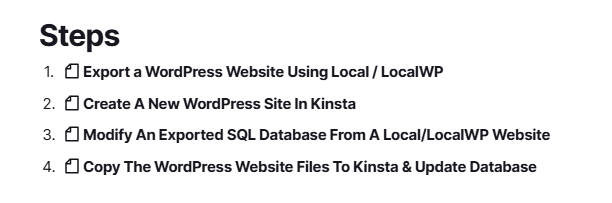
- Examples of SOPs:
- Import an Existing LocalWP WordPress Site Into the LocalWP App
- Set Up a New Domain & SSL Using Certbot
- Configure OBS Settings for Screen Recording
- The exact steps for installing printer drivers
- Etc.
- Reference Information: I store a lot of random information that I don’t need often, but when I have in the past, it’s always been hard to find. Now I know exactly where to look when I need to find these kinds of things. For example:
- Hardware MAC addresses for various devices and machines
- Vehicle VIN numbers and tire sizes
- AI Prompts
- Various links to articles and posts I’ve researched across numerous topics, all positioned in context among other related content
- Hotel, car rental, and airline booking confirmation numbers, dates, and screen shots
- Etc.
- Goals and Planning:
- Life goals and plans
- Business goals and plans
- Software development plans
- Marketing plans
- Etc.