

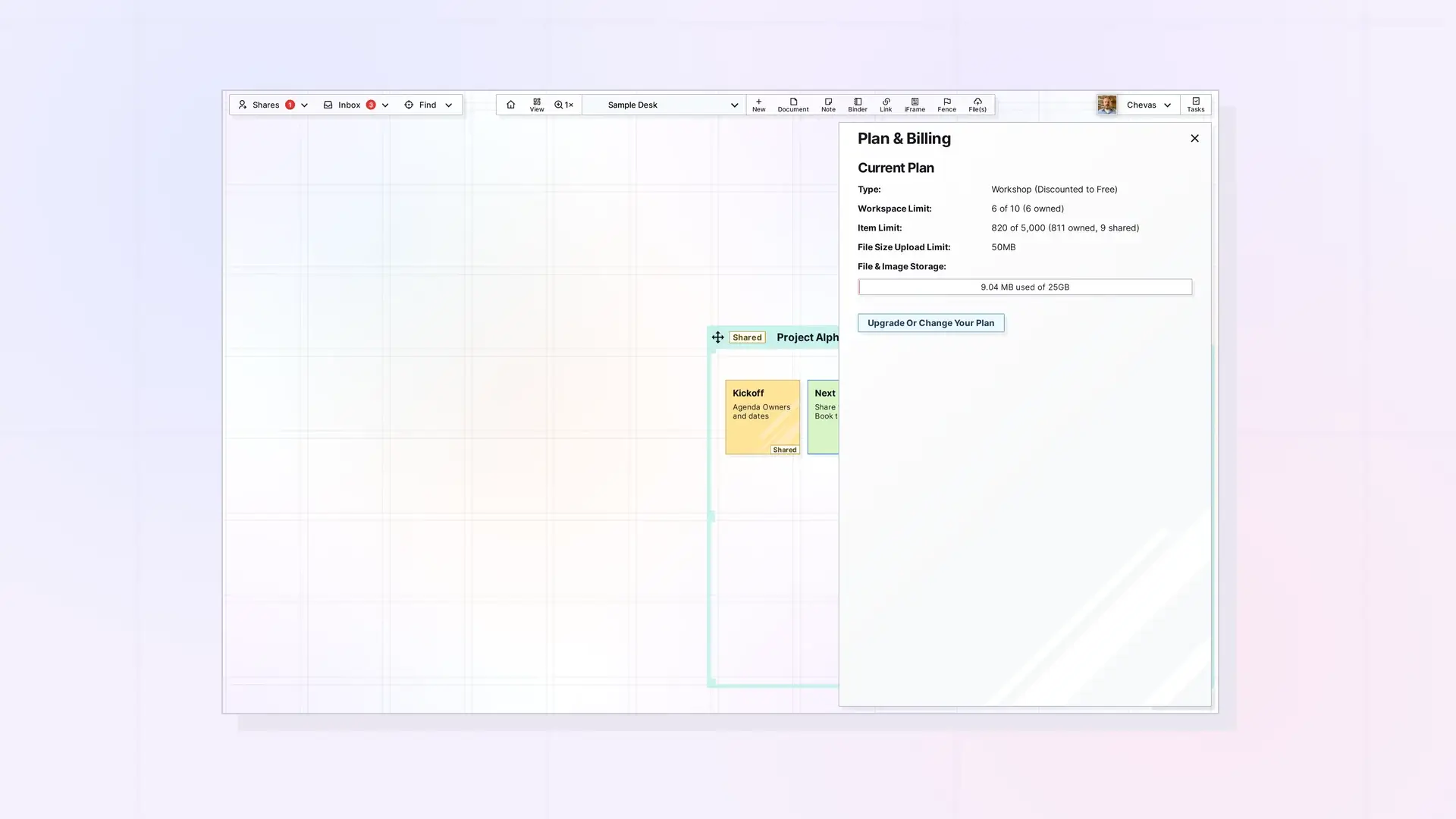
Opal limits the size of each upload and your total storage by plan. As of October 2026, Day Desk allows 5 MB per file and 250 MB of storage, Studio allows 25 MB and 1 GB, and Workshop allows 50 MB and 5 GB. Images and files count toward storage. Text you type in the block editor does not.
Limits by Plan
| Plan | Largest file | Storage | Items | Workspaces |
|---|---|---|---|---|
| Day Desk | 5 MB | 250 MB | 250 | 1 |
| Studio | 25 MB | 1 GB | 1,000 | 3 |
| Workshop | 50 MB | 5 GB | 5,000 | 7 |
Plan limits are subject to change. The Pricing page always has the current numbers.
What Counts Toward Storage
- Images, videos, and other files you upload into a document, note, or link.
- File items you upload to your workspace.
- Not counted: text you write in the block editor.
Items count toward your item limit, which is separate from storage.
Check Your Usage
Click your profile (your display name and avatar) at the top right and choose Plan & Billing. The panel shows your current plan and its limits: the workspace limit, the item limit, the file size upload limit, and a file and image storage bar that reads like “used of” your total. An Upgrade Or Change Your Plan button sits below.
When You Reach a Limit
Opal enforces your plan’s file size and storage limits when you upload. When a file is over your per-file limit, a red message appears at the bottom of the screen, for example Error uploading: Your file size limit is 50MB. (the number is your plan’s limit), and no item is created. If an upload is refused, check the file against your plan’s per-file limit and your remaining storage, then make room or change plans.
Make Room
- Delete files you no longer need. Deleting is permanent and Opal has no Trash, so keep the original on your computer if you might need it again. Delete or Archive an Item in Opal explains the steps.
- Shrink images before you upload them. An image compressor such as tinypng.com makes them smaller.
- If you keep running into the limit, compare plans on the Pricing page.
Next Steps
- Upload files: Upload Files and Images to Your Workspace (Drag and Drop)
- Learn about File items: What Is a File Item? Images, PDFs, Office Files, and More
- Add files inside documents: Notes with Images, Videos, and Files in Opal Documents
- Delete items you no longer need: Delete or Archive an Item in Opal
FAQ
Does text I write count toward storage?
No. Only images and files count toward storage. Text you write in the block editor does not.
What happens at my storage limit?
Your plan’s storage amount is the cap for images and files. When you are close to it, delete files you no longer need or change plans.
Do the same limits apply to uploads through the API?
Yes. API keys follow the same plan, item, and storage limits as the app. API access is included on Workshop.

