

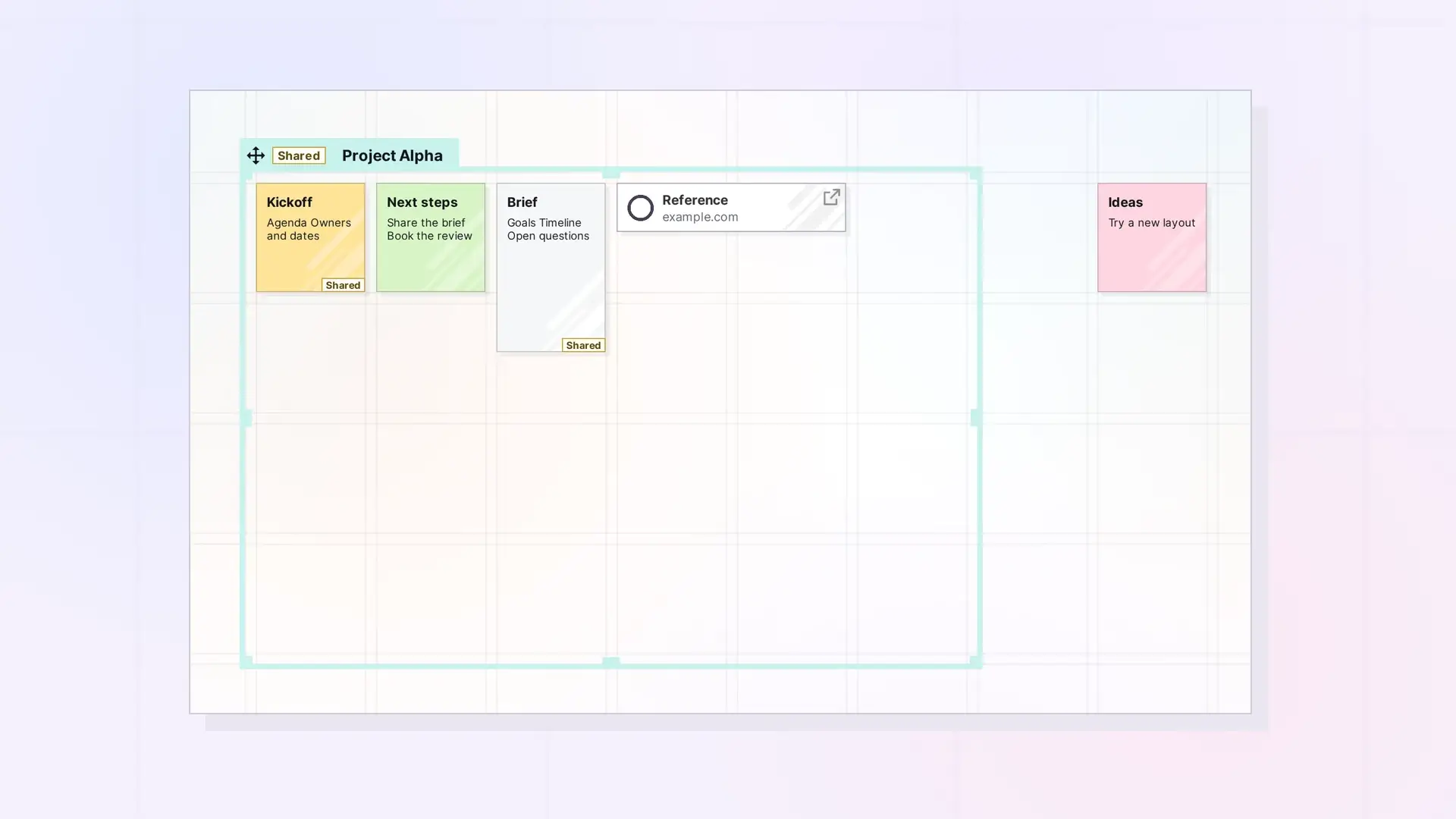
A fence is a colored zone you draw on your workspace grid. Everything whose center sits inside the fence belongs to it, so you can move, share, or publish a whole area of your desk at once. Fences are one of the two container types in Opal. The other is the binder.
What a Fence Looks Like
- A fence is a colored rectangle on the grid, measured in grid squares. It can be 1 to 30 squares wide and 1 to 30 squares tall.
- Its name sits on a tab along the top edge. Click the tab to open the fence’s side panel.
- The items inside stay fully visible on the grid. A fence does not hide or stack anything, it just draws a line around a group.
What Fences Are Good For
- Zones on a busy desk: keep “Inbox to sort”, “This week”, and “Reference” areas apart on one workspace.
- Projects: gather the notes, documents, links, and files for one project in one place you can move as a unit.
- Sharing a whole area: share the fence and everything inside it with one invitation. See Sharing a Fence: Give Others a Whole Zone of Your Desk.
- Publishing a board: publish the fence as a public page that keeps your layout.
What Can Go in a Fence
Any item can sit inside a fence: documents, notes, links, iFrames, files, binders, and even other fences. A fence can also overlap other fences. Membership is decided by position: an item belongs to the fences its center is inside, and a nested fence belongs when it sits entirely inside.
Fences vs Binders
A fence keeps items visible where they are on the grid. A binder collects items into one compact item on the grid and lists them in its panel. Both are containers, and both can be shared and published. For a side-by-side comparison, see Fences vs Binders: Which Should You Use?.
For Developers
You can create fences, add items to them, read what is inside, and move a fence with its contents through the Opal REST API. See Fences API: Add Items, Read Children, and Move a Fence.
Next Steps
- Create a Fence
- Put Items in a Fence (and Take Them Out)
- Organize a Workspace with Fences: Layout Ideas
FAQ
Does putting an item in a fence change the item?
No. The item stays on the grid exactly as it was. The fence only groups it.
Can an item be in more than one fence?
Yes. Fences can overlap and nest, and an item belongs to each fence its center is inside.
Is a fence the same as a workspace?
No. A workspace is a whole desk. A fence is a zone on one workspace. To decide how many workspaces to use, see One Workspace or Many? How to Organize Your Opal Desks.

