

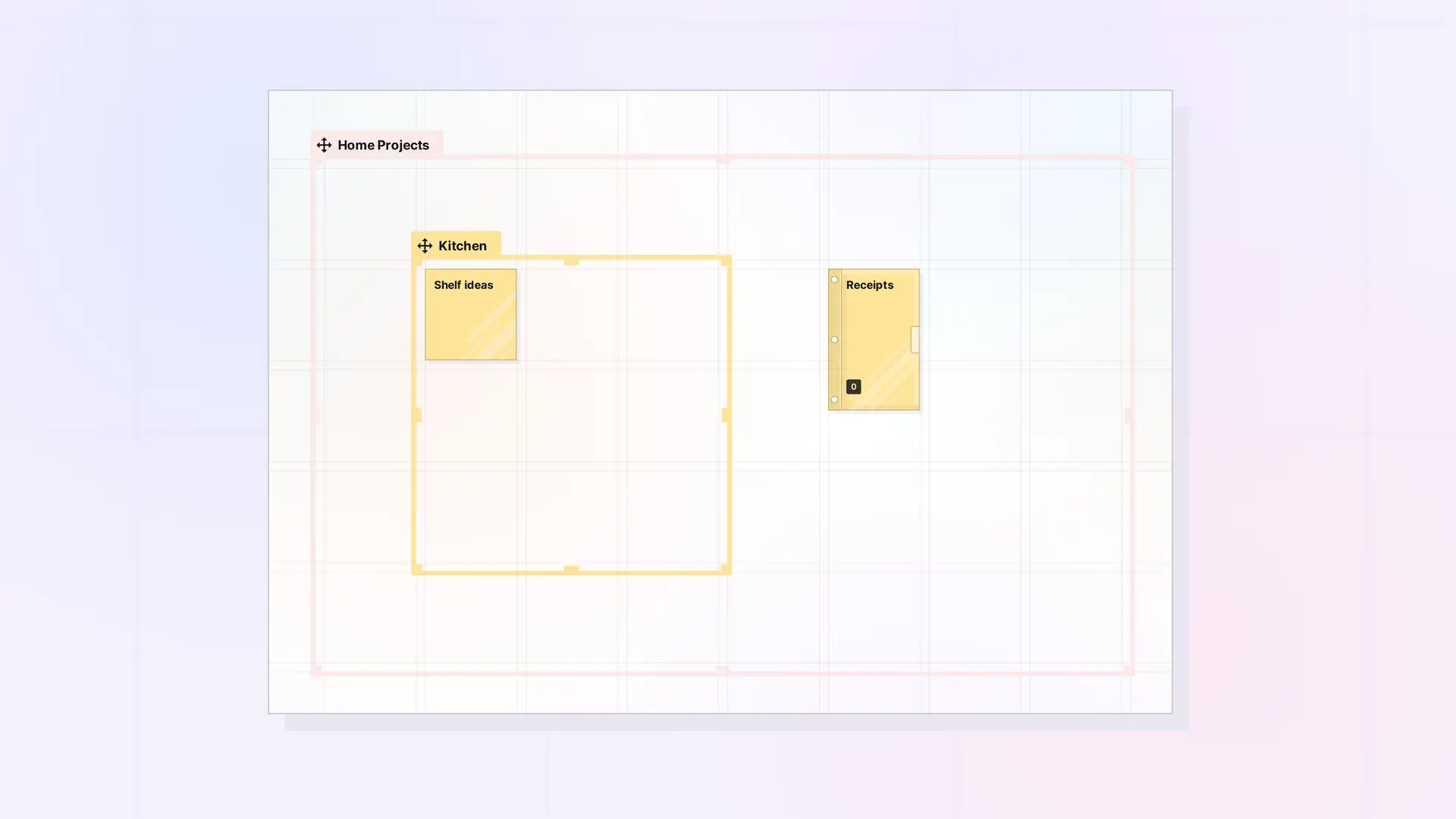
A fence groups items by position on the canvas. The Fences API adds items to a fence, takes them out, moves items inside it, reads what is in it, and moves a fence together with its children. Fence owners can use every route here. People a fence is shared with can use them with the matching toggle: canAdd to put their own items in, canEdit to move items inside, and canRemove to take out other people’s items. Moving a fence with its children stays owner-only.
How Fence Membership Works
Fence membership follows position, and the server works it out. When items move (PATCH /items/:id with a position or size, POST /items/batch/move, or PATCH /items/:id/inbox), are deleted, or are filed into or out of a binder, it updates which fences contain them. So an explicit add or remove can be undone by a later move in that workspace. An item belongs to a fence when its center is inside the fence’s body. A nested fence, with its tab, must be entirely inside. An item can be in several fences (overlapping or nested). Items filed in a binder belong through the binder. See Position Items: Batch Move, Inbox, and Z-Order for canvas coordinates.
A fence’s contents are in its fenceChildren, and each of your items lists the fences it is in, in parentFences.
Shared Fences
Fences can be shared when the account’s plan includes sharing fences and binders (shareContainers). Sharing a fence shares everything inside it, nested fences and binders included, up to 500 items and 10 levels deep. Each person places their own copy of the fence, but what is inside keeps one arrangement for everyone, and everyone sees what comes in, goes out, or moves in it, live in the app. See Sharing API: Shares, Permissions, and Recipient Placement.
- A shared fence (and a fence inside one) keeps what was put in it. Moving or resizing it does not take in what it then covers, and it cannot be made smaller than what is in it.
- What is in it is its participants’ own items: its owner’s, and those its recipients put in. An item someone shared with the fence’s owner leaves the fence when the fence is shared, and cannot go in later.
- An item a recipient puts in stays theirs. It is saved where the fence is, on the owner’s workspace, until it is taken out.
- Your own items, in a fence shared with you, are always yours to move and take out.
Shared Fence Error Codes
Shared fence refusals have a code:
| Code | When |
|---|---|
FENCE_PERMISSION_REQUIRED | You lack a toggle. requires names it (canAdd, canEdit, or canRemove). 403. |
NOT_ITEM_OWNER | Only an item’s owner can put it in a fence. 403. |
FENCE_FULL | A shared fence holds at most 500 items. 409. |
FENCE_TOO_SMALL | A shared fence cannot be made smaller than what is in it. 409. |
OUTSIDE_FENCE | offsetX/offsetY do not put the item inside the fence. 400. |
FENCE_IN_INBOX | The fence is in its owner’s inbox. 409. |
FENCE_NOT_PLACED | Your copy of the fence is not on a workspace. 409. |
Add an Item to a Fence
POST /api/v1/items/:id/fence/items
curl -X POST https://app.opalrecall.com/api/v1/items/FENCE_ID/fence/items \
  -H "Authorization: Bearer opal_live_xxx" \
  -H "Content-Type: application/json" \
  -d '{"itemId":"CHILD_ID","offsetX":40,"offsetY":40}'
Puts your own item in a fence: your own fence, or a shared one you have canAdd on. Only an item’s owner can put it in a fence. offsetX/offsetY are its place inside the fence, from the fence’s position (default 20, 20), and it is saved there, on the fence’s workspace. itemId must be a submission ID. Returns 400 if the target is not a fence or the item is already in it. Returns the updated fence under data and the item under item.
You can also create an item straight into a fence: POST /items with fenceId and optional offsetX/offsetY. See Items API: List, Get, Create, Update, and Delete.
Remove an Item From a Fence
DELETE /api/v1/items/:id/fence/items/:itemId
curl -X DELETE https://app.opalrecall.com/api/v1/items/FENCE_ID/fence/items/CHILD_ID \
  -H "Authorization: Bearer opal_live_xxx" \
  -H "Content-Type: application/json" \
  -d '{"placement":{"xPosition":9000,"yPosition":10000}}'
Takes an item out of a fence. :itemId must be a submission ID, and placement is optional. Your own item goes to placement (where you see the fence: outside it), or else just to the right of the fence. Someone else’s item (this needs canRemove) goes back to its owner, just outside their copy of the fence (or to their inbox). If it is also shared with you on its own, your place for it is the placement. An item that is not in the fence leaves it unchanged.
Returns the updated fence under data, and result: { "outcome": "left" } or { "outcome": "returned", "returnedTo": { "userId", "name" } }.
Move an Item Inside a Fence
PATCH /api/v1/items/:id/fence/items/:itemId
curl -X PATCH https://app.opalrecall.com/api/v1/items/FENCE_ID/fence/items/CHILD_ID \
  -H "Authorization: Bearer opal_live_xxx" \
  -H "Content-Type: application/json" \
  -d '{"offsetX":120,"offsetY":60}'
Moves an item inside a fence (canEdit) to a place inside it. It stays inside the walls: a place past them is pulled back to the edge. Returns { "data": { "id", "status", "offsetX", "offsetY", "xPosition", "yPosition" } }, where the offsets are where it ended up and xPosition/yPosition are where you see it.
Move Many Items Inside a Fence
POST /api/v1/items/:id/fence/items/batch-move
curl -X POST https://app.opalrecall.com/api/v1/items/FENCE_ID/fence/items/batch-move \
  -H "Authorization: Bearer opal_live_xxx" \
  -H "Content-Type: application/json" \
  -d '{"moves":[{"itemId":"CHILD_ID","offsetX":20,"offsetY":20},{"itemId":"OTHER_CHILD_ID","offsetX":130,"offsetY":20}]}'
Moves up to 500 items in the fence, each as for one item, and everyone sees it as one change. Returns { "data": { "results": [...] } }, one entry per item.
Get a Fence’s Children
GET /api/v1/items/:id/fence/children
curl "https://app.opalrecall.com/api/v1/items/FENCE_ID/fence/children?depth=2" \
  -H "Authorization: Bearer opal_live_xxx"
Available to the fence’s owner and to anyone who can see it (it is shared with them, or it is inside a fence shared with them). Anyone else gets 403. ?depth=N (1 to 10, default 1) also includes what is in the fences inside it, N levels down. Returns:
{
  "data": {
    "fence": { "id": "...", "xPosition": 5000, "yPosition": 5000, "fenceWidth": "3", "fenceHeight": "3", "isShared": true, "workspace": "...", "inInbox": false, "effectivePermissions": {...}, "permissionSources": [...] },
    "children": [
      { "id": "...", "title": "Plan", "itemType": "note", "ownerSubmissionId": "...", "parentFence": "...", "depth": 1, "offsetX": 100, "offsetY": 100, "xPosition": 5100, "yPosition": 5100, "zPosition": 3, "effectivePermissions": {...}, "permissionSources": [...] }
    ]
  }
}
offsetX/offsetY are an item’s place inside the fence: its position minus the fence’s. xPosition/yPosition are where it is for you: for the fence’s owner, on their workspace, and for someone it is shared with, inside their copy (the fence’s own xPosition, yPosition, and workspace are their copy’s). parentFence is the fence it is directly in. Your own items have effectivePermissions: null and permissionSources: [{ "source": "owner" }]. Anyone else’s have what you may do with them. A shared fence lists only its participants’ items (its owner’s and its recipients’).
Move a Fence With Its Children
POST /api/v1/items/:id/fence/move
curl -X POST https://app.opalrecall.com/api/v1/items/FENCE_ID/fence/move \
  -H "Authorization: Bearer opal_live_xxx" \
  -H "Content-Type: application/json" \
  -d '{"deltaX":110,"deltaY":0}'
Owner-only. deltaX and deltaY are required and must be JSON numbers (400 for strings or null). Moves the fence and its current children by the same delta and returns:
{ "data": { "fence": { id, xPosition, yPosition }, "childrenMoved": n, "children": [{ id, xPosition, yPosition }] } }
The canvas grid is 110 units, so a delta of 110 moves everything one grid cell.
Create and Resize a Fence
Create a fence with POST /items and type: "fence". Use fenceWidth and fenceHeight for its size in grid cells (1 to 30, default 1). A fence covers 20 + 110 x fenceWidth by 20 + 110 x fenceHeight units. Changing the size later with PATCH /items/:id needs canEdit and canResize for a share recipient, and resizing a shared fence changes it for everyone. A shared fence cannot be made smaller than what is in it (409 with FENCE_TOO_SMALL). See Items API: List, Get, Create, Update, and Delete.
Owner Settings for a Shared Fence
keepItemsInFence(owner only, set withPATCH /items/:id): when another fence is moved with its contents in the app, items that are also in this fence stay in it (true, the default), or go with the other fence and leave this one for everyone (false, after the app asks). See Items API: List, Get, Create, Update, and Delete.ownerControlsItems(owner only, set withPATCH /items/:id/owner-controls-items): items other people put in your fence are yours to delete, and when a participant leaves or is removed, their items become yours, where they are, as far as your storage has room. See Binders API: Add, Remove, Reorder, and Duplicate.
Delete a Fence
Deleting a fence (DELETE /items/:id) leaves its items where they are. Add ?deleteContents=true to delete the fence and your items in it. Items other people put in your shared fence are, with ownerControlsItems on, deleted with it (deleteContents=true) or made yours where they are, as far as your storage has room. Otherwise (and for those that do not fit) each goes back to its owner, just outside where they have the fence, or to their inbox. Everything inside counts, fences inside it included. A shared fence of yours inside it, deleted too, is emptied the same way first.
For a fence, the response is { "data": { "deleted": true, "id": "...", "deletedItems": n, "returnedItems": n, "notTakenItems": n } }. See Items API: List, Get, Create, Update, and Delete.
Fences, Sharing, and Publishing
- Fences can be shared. Sharing a fence shares everything inside it, nested fences and binders included, up to 500 items and 10 levels deep (
400withFENCE_TOO_LARGEorFENCE_TOO_DEEP). See Sharing API: Shares, Permissions, and Recipient Placement. - The owner of a shared fence can hand it to one of its members. See Reassign Owner API: Hand a Shared Item, Binder, or Fence to a Member.
- A fence can be published by its owner only, on a plan with
publishContainers. A published fence is limited to 500 descendants and 10 levels of nested fences. See Publishing API: Publish, Refresh, Status, and Unpublish.
Next Steps
- Share a fence: Sharing API: Shares, Permissions, and Recipient Placement
- Move many items at once: Position Items: Batch Move, Inbox, and Z-Order
- Publish a fence: Publishing API: Publish, Refresh, Status, and Unpublish
- Create items and fences: Items API: List, Get, Create, Update, and Delete
- Group items in a binder instead: Binders API: Add, Remove, Reorder, and Duplicate
FAQ
How does an item belong to a fence?
An item belongs to a fence when its center is inside the fence. A nested fence must be entirely inside.
Why did an item leave the fence after I added it?
Fence membership follows position. Moving items recomputes which fences contain them, so a later move in that workspace can undo an explicit add. A shared fence is different: it keeps what was put in it.
Can I share a fence through the API?
Yes. Share it with POST /shares like any item. It needs shareContainers on the account’s plan, and the fence can hold at most 500 items, nested at most 10 levels deep. See Sharing API: Shares, Permissions, and Recipient Placement.
Can a shared recipient change a fence?
Yes, with the right toggles. canAdd lets them put their own items in, canEdit lets them move items inside it, canRemove lets them take out other people’s items, and canEdit plus canResize lets them resize it, for everyone. Moving the fence with its children stays owner-only.
What happens to items in a fence when I delete the fence?
They stay where they are. With deleteContents=true, your items in it are deleted too. Items other people put in it go back to them unless the fence has ownerControlsItems on.

