

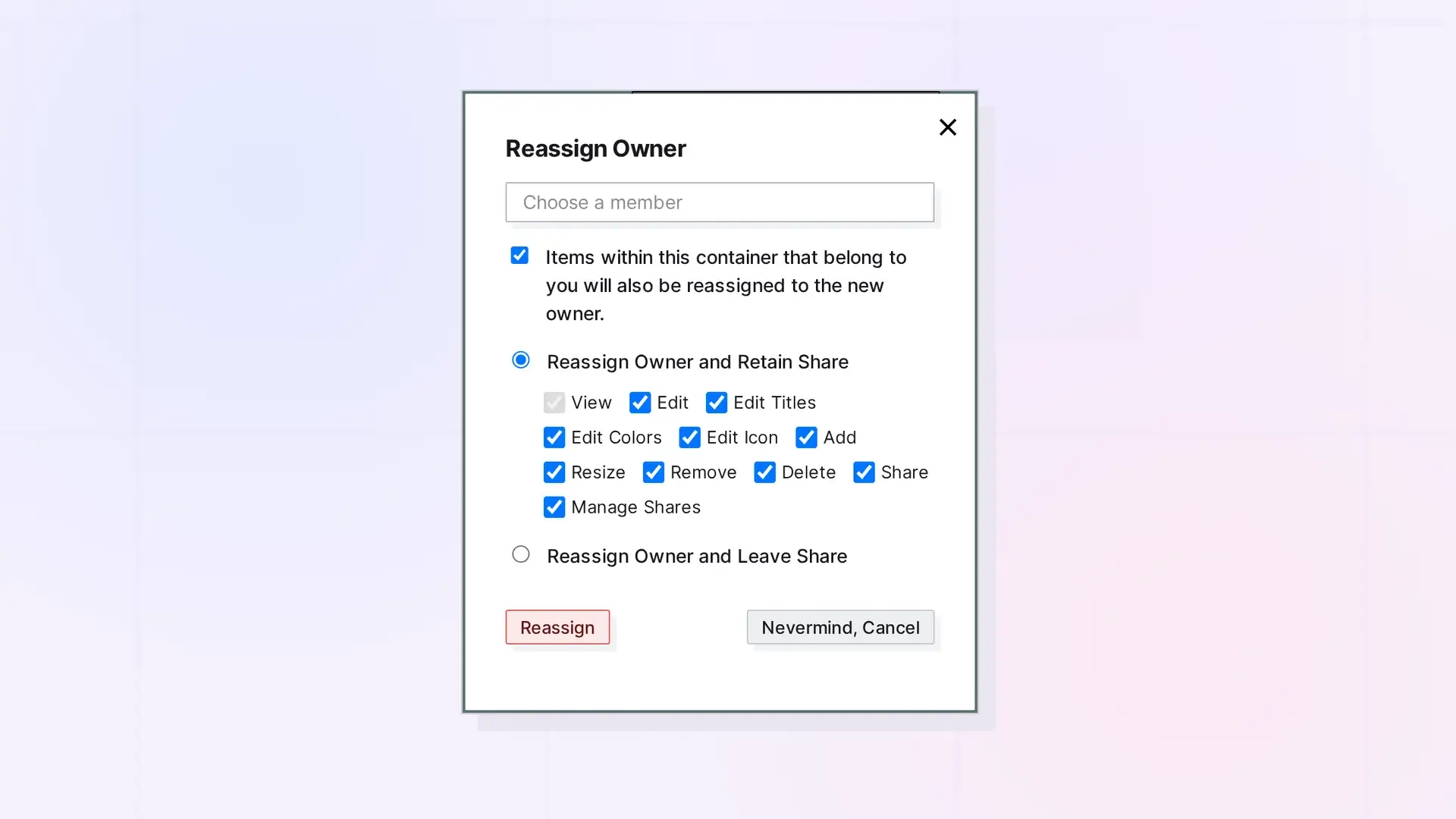
The owner of a shared item, binder, or fence can hand it to one of its members with POST /items/:id/reassign. A member is someone who has accepted a share of it. A pending invitation does not count. The item becomes the new owner’s, and by default you keep an accepted share of it. Only the current owner can call this route. A large binder or fence can be handed off in the background.
Reassigning is part of sharing. To share an item, binder, or fence first, see Sharing API: Shares, Permissions, and Recipient Placement.
Find the New Owner’s User ID
GET /api/v1/shares/outgoing
curl https://app.opalrecall.com/api/v1/shares/outgoing \
  -H "Authorization: Bearer opal_live_xxx"
Each accepted share of an item you own has recipient: { userId, displayName, email }. Send that member’s recipient.userId as newOwnerId. Pending shares, including invitations to people without an account, are not listed, and those people cannot receive the item until they accept. Add ?containerType=binder or ?containerType=fence to list only shares of that kind of container.
Reassign an Item, Binder, or Fence
POST /api/v1/items/:id/reassign
curl -X POST https://app.opalrecall.com/api/v1/items/ITEM_ID/reassign \
  -H "Authorization: Bearer opal_live_xxx" \
  -H "Content-Type: application/json" \
  -d '{"newOwnerId":"USER_ID","includeContents":true,"retainShare":true,"permissions":{"canView":true,"canEdit":true,"canDelete":true}}'
| Field | Required | Notes |
|---|---|---|
newOwnerId | Yes | The user ID of a member: recipient.userId on their share in GET /shares/outgoing. |
includeContents | No | Binders and fences only. Default true: your items in it go to the new owner too, binders and fences inside it included. A fence’s contents move with it to where the new owner has the fence. Items other people put in it stay theirs. |
retainShare | No | Default true: you keep an accepted share of it, where you had it. With false you leave it. |
permissions | No | The toggles on the share you keep. Default: all of them, plus canPublish for an item that is not a binder or fence. |
background | No | Default false. With true, the route answers 202 with a transferId as soon as the request is checked and under way. Use it for a large binder or fence. See below. |
Hand Off a Large Binder or Fence in the Background
A large binder or fence takes a while to hand off. Send "background": true and the route answers 202 as soon as the request is checked and under way. A refusal still comes back at once, with the codes below.
curl -X POST https://app.opalrecall.com/api/v1/items/FENCE_ID/reassign \
  -H "Authorization: Bearer opal_live_xxx" \
  -H "Content-Type: application/json" \
  -d '{"newOwnerId":"USER_ID","includeContents":true,"background":true}'
{
  "data": {
    "transferId": "TRANSFER_ID",
    "status": "running"
  }
}
Then ask how it is going:
GET /api/v1/items/reassign/:transferId
curl https://app.opalrecall.com/api/v1/items/reassign/TRANSFER_ID \
  -H "Authorization: Bearer opal_live_xxx"
Returns { "data": { "status": "running" | "done" | "failed" } }. When it is done, result holds the same fields as the response below. When it failed, error and code say why. Only the user who started the reassignment can ask, for up to 15 minutes after it ends. Anyone else, an unknown ID, or a later check gets 404 (Transfer not found).
While a Reassignment Is Under Way
The item and everything the reassignment moves (a binder’s or fence’s contents) are locked until it ends. Reads go on as usual, but any change to them, by anyone, through the API or the app, returns 423 with code: "ITEM_TRANSFERRING". In POST /items/batch/move, a locked item gets that result on its own (code: 409, reason: "ITEM_TRANSFERRING") and the other items still move. Wait, then try again once the reassignment is done.
What Happens to the Item
- It becomes the new owner’s. Its files and image icon move into their storage.
- It ends up where the new owner already had it: their share’s workspace and position, or the binder they filed it in.
- Its other shares stay, and now belong to the new owner. The new owner’s own share of it is removed, because they own it now.
- With
includeContentson, your items inside a binder or fence go along. Items other people put in it stay theirs.
Keeping or Leaving the Share
By default (retainShare: true) you keep an accepted share of the item, in the place where you had it, with the toggles in permissions. With retainShare: false you leave it completely. Your items inside it that did not go with it come back to you: taken out of a binder, or left where they are when it is a fence.
Published Pages
- Your published page of the item stays only if you keep a share with
canPublish. - Your published pages of items that went along with a binder or fence are taken down.
See Publishing API: Publish, Refresh, Status, and Unpublish.
When a Reassignment Is Refused
Nothing changes when a reassignment is refused.
| Status | Code | When |
|---|---|---|
403 | NOT_OWNER | You are not the owner. |
400 | NOT_A_MEMBER | The new owner has not accepted a share of the item. |
409 | NO_ROOM | The new owner’s storage has no room for the files. |
403 | CONTAINER_SHARE_REQUIRES_UPGRADE | A binder or fence that stays shared (you keep a share, or others have one) and the new owner’s plan doesn’t include sharing fences and binders (shareContainers). |
Response
{
  "data": {
    "itemId": "...",
    "newOwnerId": "...",
    "reassignedItemIds": [...],
    "shareRecordId": "YOUR_NEW_SHARE_ID or null",
    "releasedItemIds": [...]
  }
}
shareRecordId is the share you kept, or null when you left it. With "background": true, the route answers 202 with a transferId instead, and this object comes back as result from GET /items/reassign/:transferId when it is done.
Next Steps
- Share an item, binder, or fence first: Sharing API: Shares, Permissions, and Recipient Placement
- Work with shared fences: Fences API: Add Items, Read Children, and Move a Fence
- Work with binders: Binders API: Add, Remove, Reorder, and Duplicate
- See it in a full sequence: REST API Recipes: Create, Arrange, Share, Publish, and Export
FAQ
Who can reassign an item?
Only its current owner. Anyone else gets 403 with NOT_OWNER.
Can I hand an item to someone who has not accepted the share yet?
No. The new owner must be a member, someone who accepted a share of it. Otherwise the route returns 400 with NOT_A_MEMBER.
Does the new owner need storage room?
Yes. The item’s files move into their storage. If there is no room, the route returns 409 with NO_ROOM and nothing changes.
What happens to other people who have it shared?
Their shares stay, and now belong to the new owner.
Do items other people put in my binder or fence go to the new owner?
No. With includeContents on, only your own items inside go along. Items other people put in it stay theirs.
What does 423 ITEM_TRANSFERRING mean?
The item, or the binder or fence it is in, is being handed to a new owner right now. Changes wait until that is done. Reads still work. Try again in a moment.
How do I know when a background reassignment is done?
Check GET /items/reassign/:transferId with the transferId from the 202 response until status is done or failed. Only you can check it, for up to 15 minutes after it ends.

