

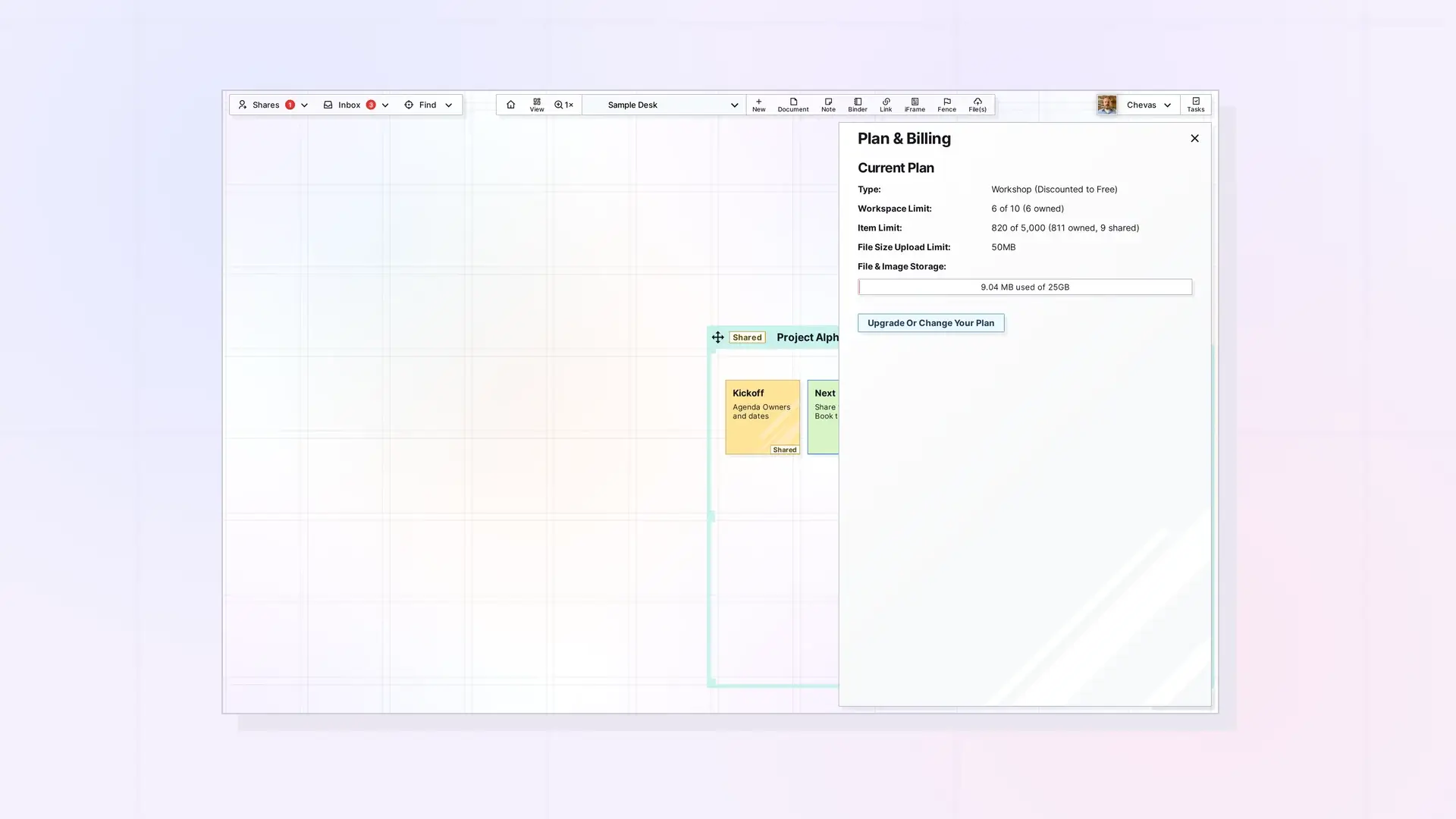
Call GET /account to read your Opal plan, its limits and features, your current usage, and your account status. Do it before bulk work such as many creates, uploads, or accepts, so you stay inside your plan. Read-only keys and locked accounts can call it. API access itself needs the Workshop plan.
Get Account
GET /api/v1/account
curl https://app.opalrecall.com/api/v1/account \
  -H "Authorization: Bearer opal_live_xxx"
Response:
{
  "data": {
    "plan": {
      "id": "workshopMonthly",
      "name": "Workshop",
      "billing": "monthly",
      "readOnly": false,
      "limits": {
        "workspaces": 7,
        "items": 5000,
        "storageBytes": 5368709120,
        "fileSizeBytes": 52428800
      },
      "features": {
        "publishItems": true,
        "publishContainers": true,
        "shareContainers": true,
        "apiAccess": true,
        "integrations": true
      }
    },
    "usage": {
      "workspaces": 3,
      "items": {
        "total": 1504,
        "owned": 1500,
        "shared": 4
      },
      "storageBytes": 123456789
    },
    "status": {
      "locked": false,
      "lockedAt": null,
      "subscriptionStatus": "active",
      "cancelAtPeriodEnd": false,
      "currentPeriodEnd": "2026-11-01T00:00:00.000Z",
      "deletionDate": null
    }
  }
}
Response Fields
| Field | Notes |
|---|---|
plan.id | Plan ID such as workshopMonthly, premiumYearly, or viewOnly. |
plan.name | The name shown in the app, such as Day Desk, Studio, Workshop, or View Only. Legacy plans report the name they map to. |
plan.billing | monthly, yearly, comped (a paid plan given at no cost), or null. |
plan.readOnly | true for View Only. |
plan.limits | workspaces, items (null means unlimited), storageBytes, and fileSizeBytes. |
plan.features | publishItems, publishContainers, shareContainers, apiAccess, and integrations. |
usage.workspaces | Workspaces you own. |
usage.items | owned, shared (a binder or fence share counts the container and everything in it), and total, which is what the item limit checks. |
usage.storageBytes | Storage counted against your storage limit: mainly files uploaded as items and media stored in Opal inside your items. Links to files elsewhere do not count. |
status.locked, status.lockedAt | Whether the account is view-only, and since when. |
status.subscriptionStatus, status.cancelAtPeriodEnd, status.currentPeriodEnd | The subscription as Opal last recorded it. These can be null or false when no subscription is recorded, for example on a comped plan. |
status.deletionDate | For a locked account with a lock date: when its data will be deleted (12 months after the lock). Otherwise null. |
Work Out How Much Room Is Left
- Items:
plan.limits.items - usage.items.total - Storage:
plan.limits.storageBytes - usage.storageBytes - Workspaces:
plan.limits.workspaces - usage.workspaces - File size: check
plan.limits.fileSizeBytesbefore each upload.
Sizes are binary (1 MB = 1,048,576 bytes), and GET /account returns exact byte values. The item limit counts items you own plus items shared with you, and an accepted binder or fence share counts as the container plus everything in it.
Plan Limits
| Plan | Workspaces | Items | Storage | Max file size |
|---|---|---|---|---|
| Day Desk | 1 | 250 | 250 MB | 5 MB |
| Studio | 3 | 1,000 | 1 GB | 25 MB |
| Workshop | 7 | 5,000 | 5 GB | 50 MB |
| View Only (locked accounts) | 0 | 5 | 250 MB | 5 MB |
Limits are subject to change. The Pricing page and File Size and Storage Limits by Plan have the current numbers for the plans you can buy.
Plan Features
| Plan | Publish items | Publish binders and fences | Share binders and fences | API access | Integrations |
|---|---|---|---|---|---|
| Day Desk | Yes | No | No | No | No |
| Studio | Yes | Yes | Yes | No | Yes |
| Workshop | Yes | Yes | Yes | Yes | Yes |
| View Only | No | No | No | No | No |
In GET /account these features are named publishItems, publishContainers, shareContainers, apiAccess, and integrations. Sharing a binder or fence needs shareContainers on the sender’s plan, and accepting one needs it on the recipient’s plan.
API Access by Plan
API access is included on the Workshop plan (monthly, yearly, or complimentary). Accounts on an older plan that the app shows as Workshop also have it. On any other plan, every API-key request returns 403:
{
  "error": "API access requires a Workshop plan",
  "code": "FEATURE_NOT_IN_PLAN",
  "feature": "apiAccess",
  "upgrade_url": "https://opalrecall.com/pricing"
}
Locked (view-only) accounts are the exception: their existing keys keep working for reads.
Locked Accounts
An account is locked (view-only) when its subscription has ended, and when someone joined from a share invitation without choosing a plan. Its plan becomes View Only, and GET /account returns status.locked: true.
| Area | Behavior |
|---|---|
| Reads | GET requests keep working with existing keys, including GET /account, GET /views, and GET /export. |
| Writes | Every other method returns 403 with {"error":"Your account is view-only. Resubscribe to make changes.","code":"ACCOUNT_LOCKED"}. This includes accepting and declining shares and copies through the API. The app still lets a view-only account accept up to 5 shared items or copies. |
| API keys | Existing keys keep working for reads. New keys cannot be created, because View Only does not include API access. Keys can still be revoked in the app. |
| Items the locked account shared | Recipients get view-only access, whatever the share granted. |
| Published pages | Go offline 30 days after the lock (immediately if no lock date was recorded) and come back if the account resubscribes. |
| Data | Deleted 12 months after the lock, with warning emails 30 days and 7 days before, and never sooner than 7 days after the last warning. status.deletionDate in GET /account gives the date. View-only accounts that never had a plan are not deleted. |
The account holder resubscribes in the Opal app. The API has no billing routes.
Next Steps
- See every limit and its error response: Errors, Rate Limits, and Plan Limits in the Opal API
- Upload files within your limits: Upload Files and Media with the API
- Create keys: Opal API Keys: Create, Use, and Revoke
- Check storage limits by plan: File Size and Storage Limits by Plan: Workshop, Studio, and Day Desk
FAQ
How do I check how much storage I have left with the API?
Call GET /account and subtract usage.storageBytes from plan.limits.storageBytes.
Can a read-only key call GET /account?
Yes. Read-only keys and locked accounts can both call it.
What happens to the API when my account is locked?
Existing keys keep working for reads, including search, GET /account, and export. Every write returns 403 with code: "ACCOUNT_LOCKED". You cannot create new keys.
What counts toward my item limit?
Items you own plus items shared with you. An accepted binder or fence share counts as the container plus everything in it.

